Folded Profiles and Flashings, With the Blank and Bend List Worked Out
Describe the profile the way you'd sketch it: the legs in order, which way each bend goes, the sheet and the length. Metal Draw AI works out the blank, draws the profile for approval and lists every bend for the press brake.
Draw a Folded ProfileFree: up to 20 drawings a month, no credit card. DXF export is on Pro.
No CAD or bend tables needed. Check the radius and K-factor against your brake before cutting.
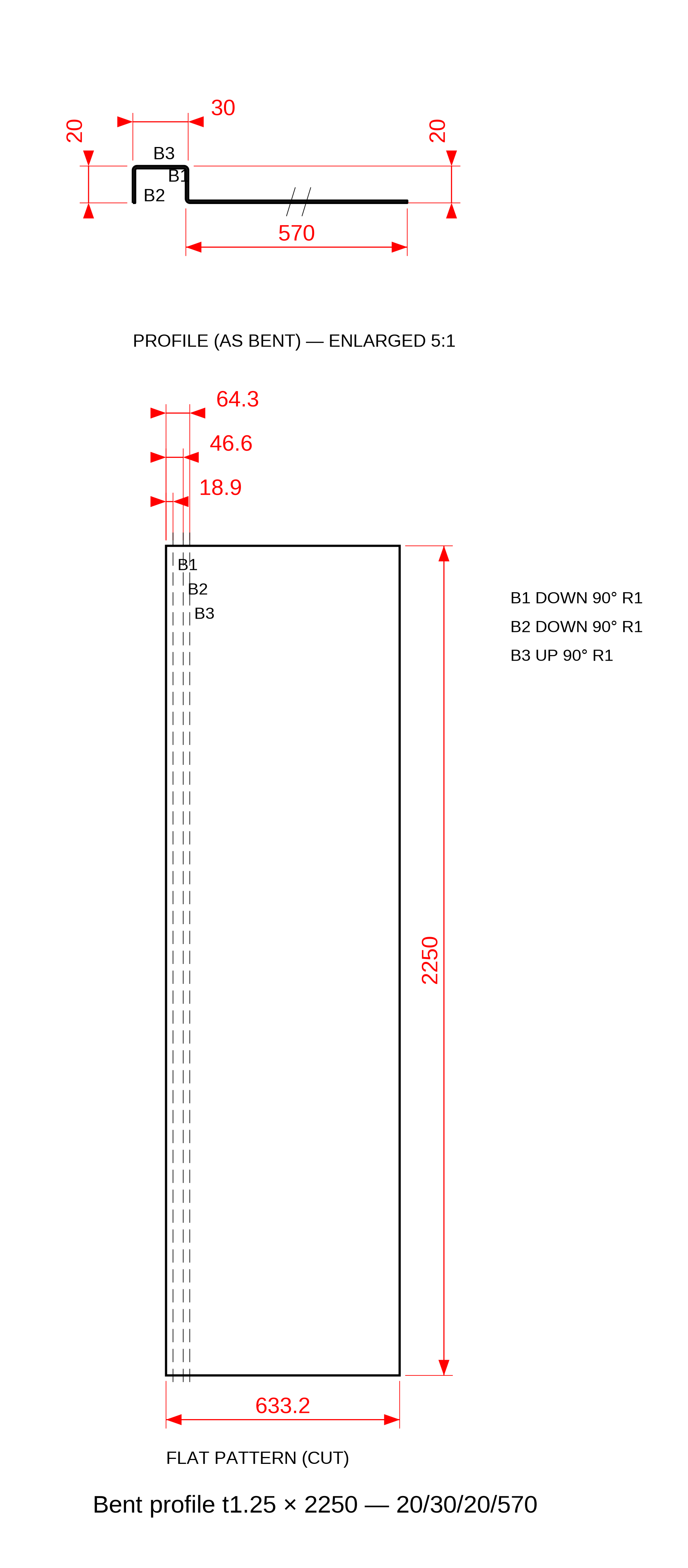
Step profile from 1.25 mm sheet, 2250 long. Legs 20, 30, 20 and 570 outside, bends down, down, up, inside radius 1.
How a folded profile usually goes
- A sketch of the profile
- Working out the blank
- Bend deductions by hand
- A bend list for the brake
- One leg changes
- Work it out again
- Every flashing, cill and capping is a new profile, and each needs its blank width before the sheet is cut.
- The blank depends on the bend radius and K-factor: get it wrong and the profile comes out short or long.
- The brake operator needs each bend's direction and angle, usually written on the sketch by hand.
- A pencil sketch doesn't show the customer what they'll get.
How it works
- 01
Describe the profile
The legs in order with their outside sizes, which way each bend goes and its angle, any hems, the sheet thickness and the length.
- 02
The blank is computed
From the bend allowance of each bend. With no radius or K-factor given it assumes the radius equals the thickness and K = 0.33, and the drawing says so.
- 03
Change it in plain English
"Make the flat 620", "1.5 mm sheet", "hem the drip edge". The blank and the bend list are worked out again.
- 04
Approve, cut, bend
Send the drawing for approval, the DXF of the blank to the cutter, and the bend list to the brake.
One step profile, from a description to a DXF
The drawings below are the app's own output for this description: the blank is computed from your numbers, not estimated.
Step profile from 1.25 mm sheet, 2250 long. Legs 20, 30, 20 and 570 outside, bends down, down, up, inside radius 1.
Make the 570 flat 620.
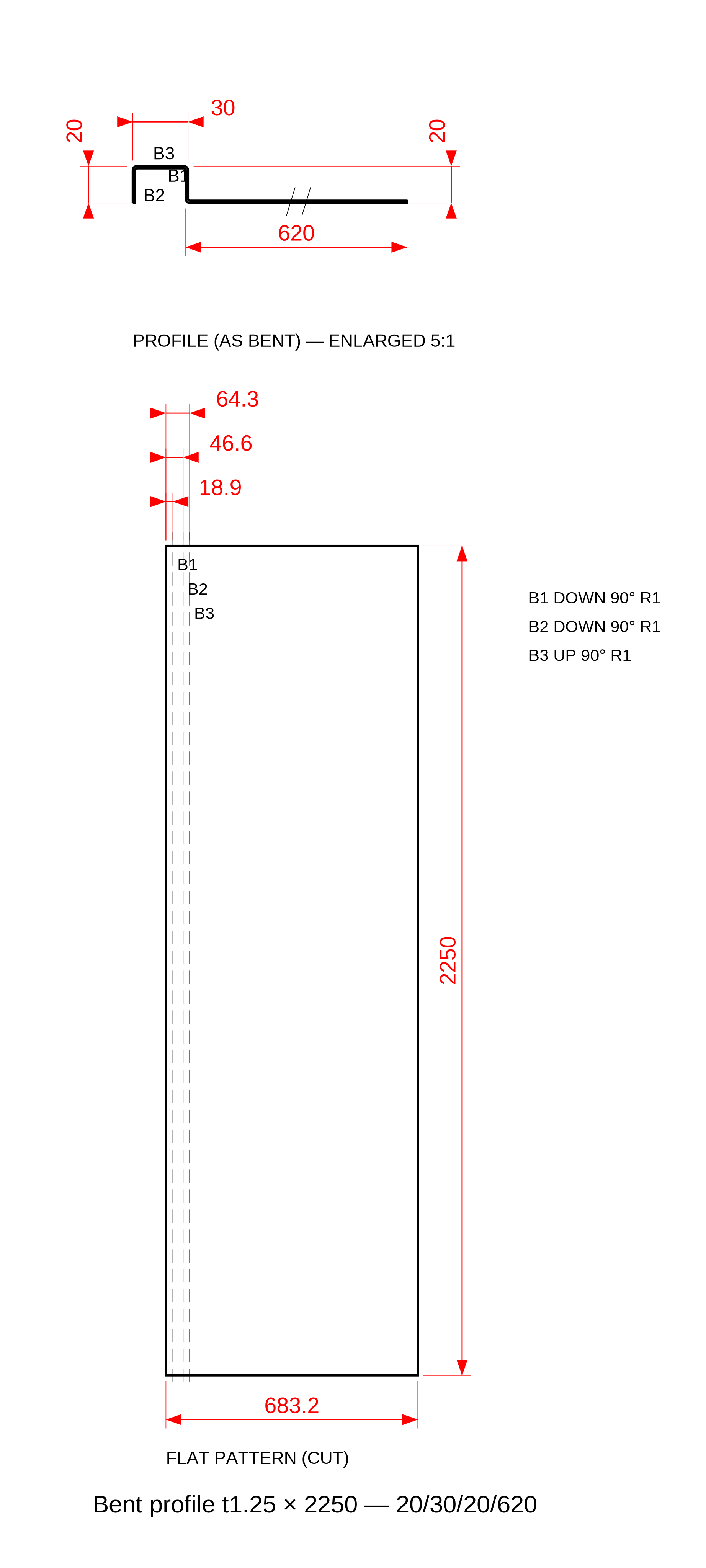
4. The parts list
- Bent profile
- Qty
- 1
- Profile
- t1.25 × 2250 — 20/30/20/620
- Blank
- 683.2 × 2250
- Process
- Laser cut, press brake (3 bends)
| Part | Qty | Profile | Blank | Process |
|---|---|---|---|---|
| Bent profile | 1 | t1.25 × 2250 — 20/30/20/620 | 683.2 × 2250 | Laser cut, press brake (3 bends) |
5. The DXF for the cutter
On Pro, the blank exports as a DXF in millimetres: its outline and any holes, without dimensions, text or bend lines. The bend lines and the bend list stay on the drawing for the press brake. On the free plan, download the drawing as SVG or PNG, or send a share link.
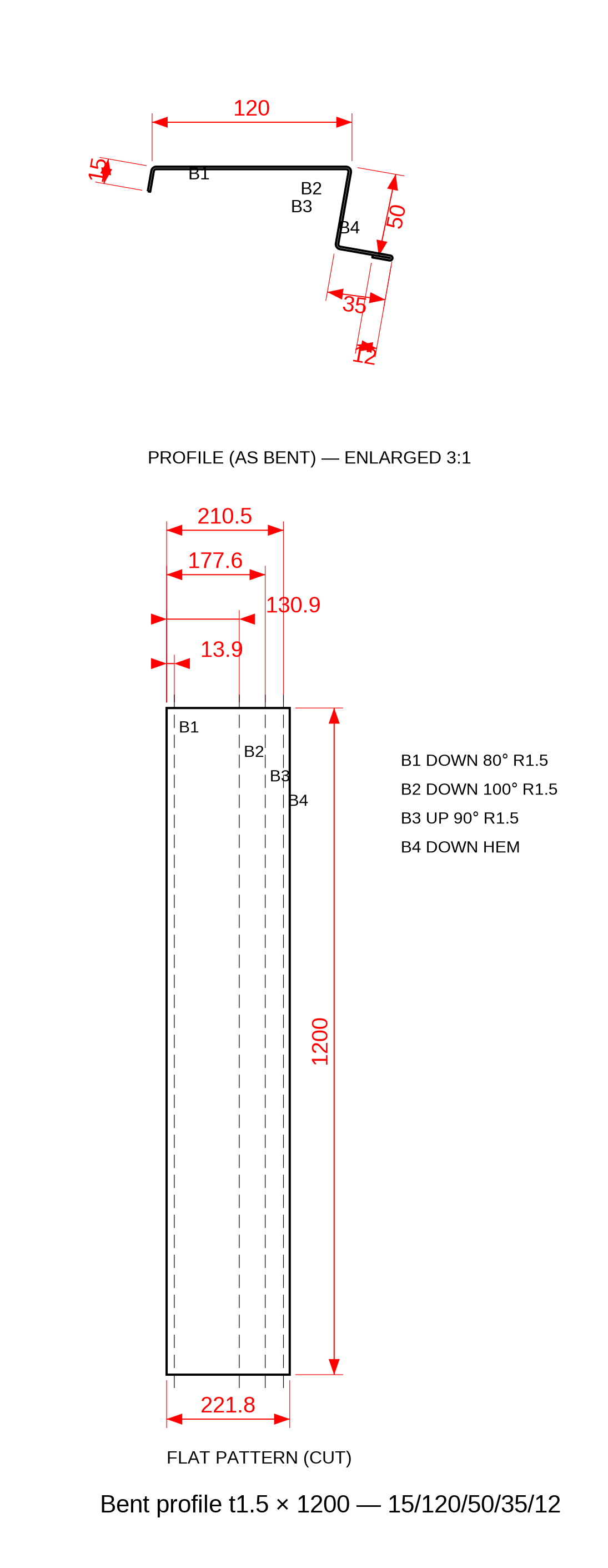
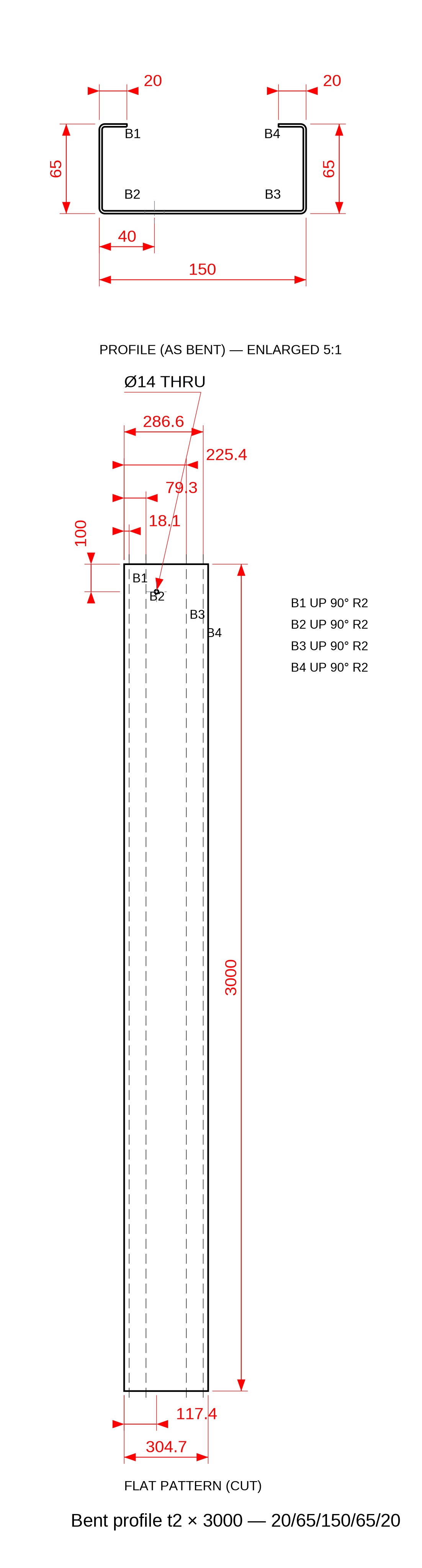
More profiles it folds
Each of these is the app's output for a one-line description: the profile enlarged, and the blank with every bend.
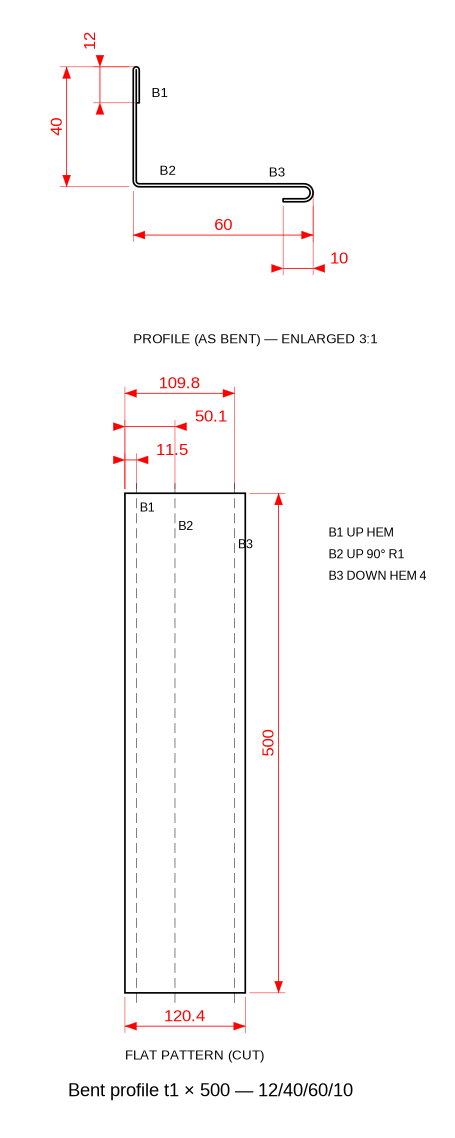
What it changes for folded profiles
- The blank width computed from the radius and K-factor, not guessed.
- A bend list for the brake: each bend's direction, angle and radius.
- Bends at any angle, and hems open or closed.
- An enlarged profile the customer can approve.
- Change a leg or the sheet in one sentence.
- A DXF of the blank for your laser or the cutting service.
Compared with how it's done today
- TodayBend deductions worked out by handWith Metal Draw AIThe blank computed for you
- TodayA sketch on a scrap of paperWith Metal Draw AIAn enlarged profile to approve
- TodayA bend list written on the sketchWith Metal Draw AIThe bend list on the drawing
- TodayEvery change worked out againWith Metal Draw AIChanges in plain English
- TodayCAD with a sheet-metal moduleWith Metal Draw AIA drawing in the browser
What it draws today
Folded and drawn
- Profiles of 2 to 12 legs, bent along parallel lines
- Bends at any angle, up or down
- Hems: closed flat, or open with a gap
- Round holes in the legs: plain, clearance for a bolt, or tapped
- Your own inside radius and K-factor
- Sizes in millimetres or inches
Not on this drawing yet
- Rolled or curved profiles
- Tapered profiles, or bend lines that aren't parallel
- Notches, corner reliefs and cut-outs other than round holes
- A hole inside a bend: the app says how far from the corner it has to be
A first draft for review. You sign it off.
Metal Draw AI creates a fast first draft for review, quoting and documentation. Check every dimension, and the radius and K-factor against your brake, before the blank is cut. It doesn't do structural calculations or engineering approval.
Common questions
- How is the blank width worked out?
- From the bend allowance of each bend, θ·(r + K·t). Give your shop's inside radius and K-factor and it uses them; if you don't, it assumes the radius equals the thickness and K = 0.33, and the drawing's notes say so.
- Are the leg sizes inside or outside?
- Outside, the way a profile is measured with a tape, and the drawing says so.
- Can it draw hems?
- Yes. A 180° bend is a hem: folded flat, or open with the gap you give.
- What's in the DXF?
- The outline of the blank and its holes, in millimetres, without dimensions, text or bend lines. DXF export is on the Pro plan.
- What if a hole lands in a bend?
- It doesn't draw it there. It says how far from the corner the hole has to be, so you can move it.
- Does it work in inches?
- Yes. Write the sizes in inches and the drawing is dimensioned in inches.
Draw the next profile you need folded
Take the next flashing or cill on your list and see the blank and bend list it makes, and the DXF on Pro.
Draw a Folded ProfileFree: up to 20 drawings a month, no credit card. DXF export is on Pro.